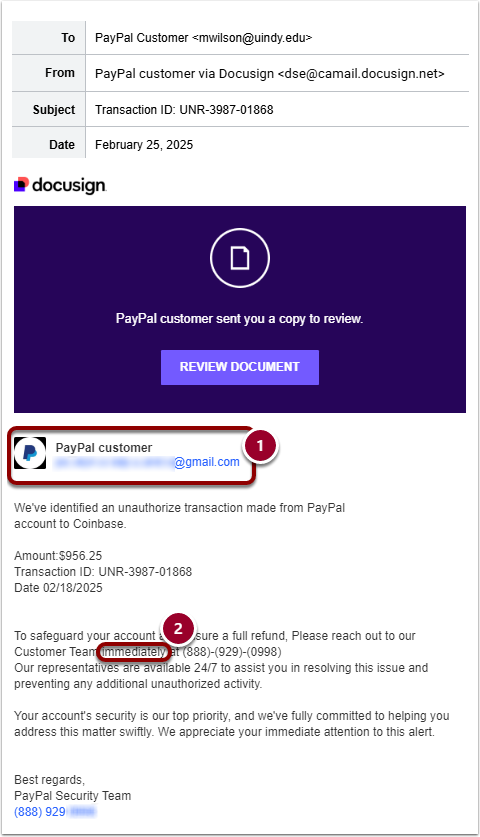
Fraudsters have continued their phishing efforts recently targeting UIndy accounts with bogus emails using Docusign for PayPal transaction notifications. These are NOT real. They are just trying to get your personally identifiable information (PII).
How to identify scam
Here are some specific red flags to recognize in this phishing email:
- Financial transactions to/from someone or some place that you don't recognize
- Sense of urgency
- Email address using multiple periods in their email address name - This is a practice to obfuscate an email address and/or bypass any spam filters that might have caught their true email address
- Paypal has its own transaction notification system and would not use Docusign
- In the body of the email, there is no mention about signing a document (which is typically what Docusign is used for)
What to do if you suspect a scam or have been scammed
- If you are unsure or believe something is fraudulent, Report a security issue and copy/paste the email or attached a printed copy for us to review.
- If you have already sent money, contact your bank or credit card company right away to close the account or dispute the charges. Then, contact UIPD ([email protected]).