When an email address/username contains a first initial that does not reflect a preferred first name, to the extent that the preferred email address is available and does not violate community decency standards, a request for a UIndy username change may be submitted.
For more details, please see the University's Name Change Policy.
Legal name change
All legal name changes must first be reported to:
- Faculty and Staff: Human Resources, Esch Hall 044, (317) 788-6132.
- Students:Office of the Registrar, Esch Hall 131, (317) 788-3219. Students must submit this form to the Office of the Registrar to initial a legal name change.
Once official records are updated, you may request a change to your UIndy email address by going to UIndy Works and searching for: email address change.
Please keep in mind the following:
- Username changes will be done when the user is available via phone or in person.
- Passwords are not affected, but some resources may be unavailable for up to 24 hours while the change propagates through all systems.
- It is recommended that username changes are done while classes are not in session to avoid inconsistencies.
Add or update preferred first name, person pronoun, and/or gender identity
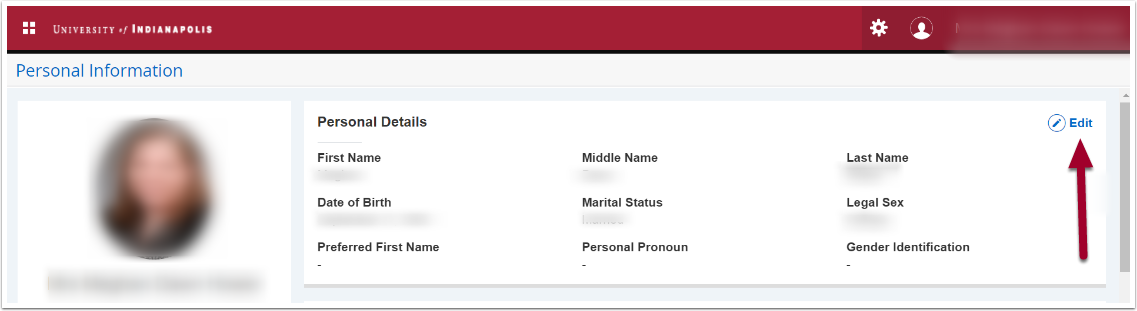
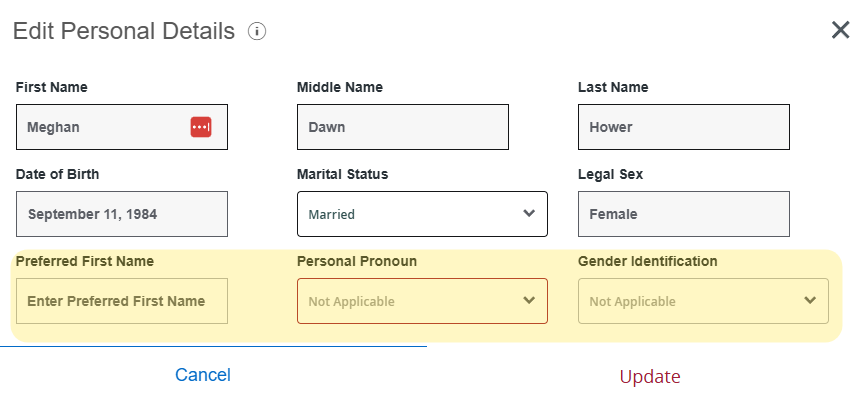
UIndy students and employees can add their preferred first name, personal pronoun, and/or gender identity in Banner on their Personal Information. To edit these fields:
- Navigate to https://banner.uindy.edu/BannerGeneralSsb/ssb/personalInformation#/personalInformationMain.
- Click on the Edit button under Personal Details.
- The Edit Personal Details box will appear. Add or edit your Preferred First Name, Personal Pronoun or Gender Identification.
- Click the Update button.
5. You may now request a change to your UIndy email address by going to UIndy Works and searching for: email address change.
Change your Google account display name
If you would like to change your Google account display name or other information, please follow the steps listed at Change your Google Account information.