UIndy IT Tech Guides

Use Brightspace (UIndy's Learning Management System)

Updated on

Brightspace is UIndy's learning management system.

Login to Brightspace

  1. Navigate to brightspace.uindy.edu.
  2. Current UIndy students will click the Sign in using your UIndy Account button.
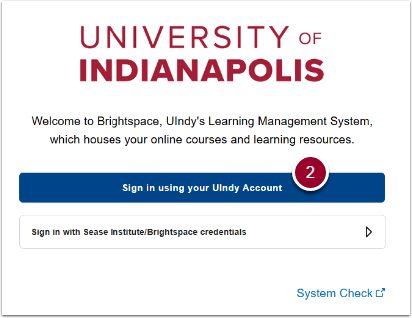
Depicts step 2
  1. Use your UIndy login credentials and authenticate with Duo.

Resources

Students: for assistance with the course material, please contact your instructor.

Instructor Resources: Training, documentation, and FAQ's for instructors provided by the Faculty Academy https://sites.google.com/uindy.edu/facultyacademy/where-can-i-get-help?authuser=0

Previous Article Upgrading to Windows 11
Next Article Using the Intelligent Video Solution (IVS) Software
Still Need Help? Contact Us